Most AI music tools give you a track. Then they leave you with a file. You still need to download it, import it into your editor, adjust the length, check the licensing, and hope it doesn’t clash with the voiceover you generated somewhere else entirely.
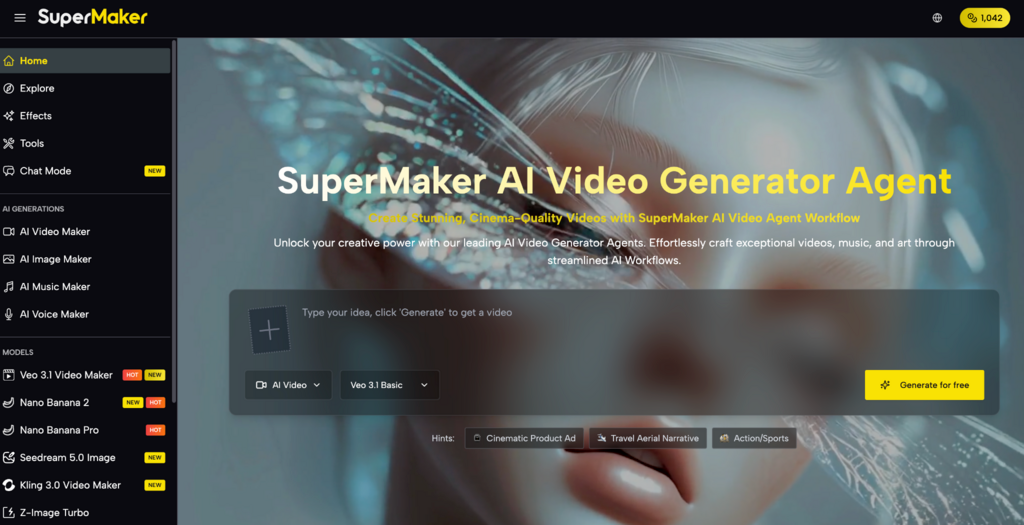
AI Video Maker is built differently. It’s the only music generator that lives inside a complete video production platform — so the track you create is already synced to your project, permanently licensed, and ready to export alongside your footage. And you can start for free, no credit card required.
Table of Contents
Why Most AI Music Tools Still Feel Disconnected
AI music generation has made remarkable progress. Tools like Suno and Udio can produce surprisingly polished tracks from a text prompt. But here’s the gap nobody addresses: a music file is not a finished video.
Getting that music into your final content still requires a separate workflow. You generate the track on one platform, download it, import it into your video editor, manually sync it to your footage, then double-check whether your plan still covers commercial use. And if the track doesn’t quite fit the mood once you hear it against the visuals, you start over — on a different platform, in a different tab. The current reality for most creators looks something like this:
- Suno or Udio for AI music generation
- ElevenLabs or Murf for the voiceover
- Runway or Kling for video footage
- CapCut or Premiere to assemble everything
- Epidemic Sound as a backup when AI music licensing gets complicated
Everything in One Workflow
This platform is an all-in-one creative tool that integrates AI music generation, video production, voice synthesis, and image creation into a single unified workflow. Every asset you create — video, voice, music — lives in the same library, feeds into the same editor, and exports in the same file. Nothing gets lost in translation between platforms.



Here’s how the platform is organized:
Pre-Production: Build Your Visual Foundation
- AI Image Maker: Generate storyboard frames, concept art, and scene references using models like GPT Image 2, Nano Banana Pro, Seedream 5.0, and Flux Kontext — with built-in editing tools including magic erase, smart uncrop, and photo restoration — then import directly into the video pipeline.
Production: Generate Music, Voice, and Video
- AI Music Maker: Generate 100% original, royalty-free music from a text description or custom prompt, with full control over genre, tempo, instrumentation, and lyrics — permanently licensed on paid plans, natively integrated into your project library, with tracks ready in 1-3 minutes.
- AI Voice Maker: Convert written scripts into professional-grade voiceovers across multiple languages, accents, and voice styles — from conversational to broadcast-ready — with results saved directly to your asset library in seconds.
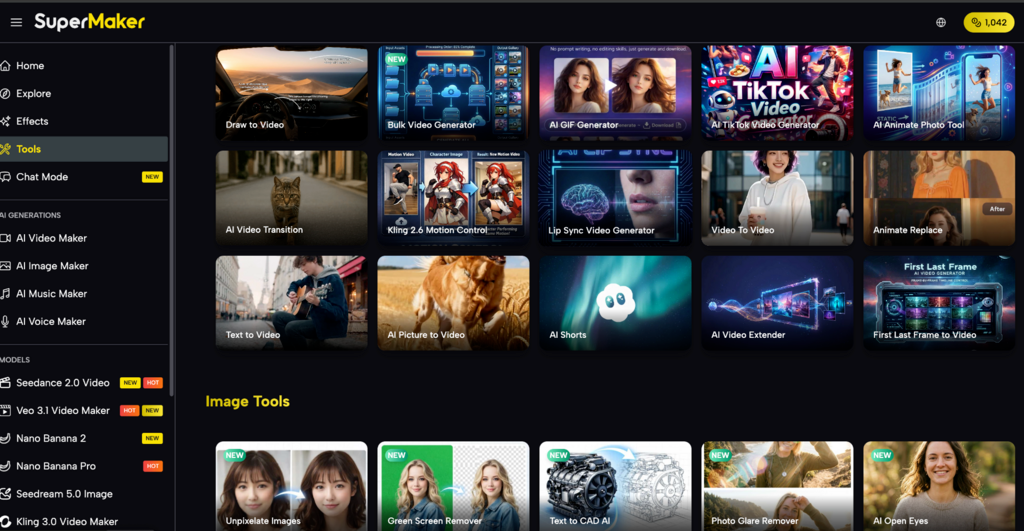
- AI Video Maker: Access 30+ industry-leading video models — including Google Veo 3.1, Kling 3.0, Seedance 2.0, and Sora — with support for text-to-video, image-to-video, lip-sync, first/last frame control, batch generation, and full commercial licensing on premium outputs.
Post-Production: Polish, Stylize, and Scale
- AI Effects Library: Apply 100+ one-click visual effects and trending formats — including AI Red Carpet Video, baseball fancam, sketch-to-video, and photo-to-dance — optimized for TikTok, Instagram Reels, and YouTube Shorts, with new effects added regularly.
- AI Studio (Canvas Workflow): Chain any combination of text, image, video, voice, and music models together on an infinite no-code canvas — with batch processing of up to 4 variations per node, auto-save, and reusable workflow templates for high-volume production.
The tool runs entirely in the browser — no download, no installation required. A mobile app is also available for iOS and Android.
Create a Complete Video with Original Music in 10 Minutes
- Step 1 – Write your video prompt: Describe your scene — mood, movement, visual style, and camera angle. Select your model, aspect ratio, and duration, then hit Generate.
- Step 2 – Generate your video: Your output saves automatically to your asset library. Tweak the prompt or switch models, if needed — Kling 3.0 for natural motion, Veo 3.1 for cinematic lighting.
- Step 3 – Generate your music: Describe the mood that fits your footage (“warm acoustic guitar, upbeat, 60 seconds”) and generate an original track. Use Custom Mode to dial in genre, instrumentation, and BPM.
- Step 4 – Add a voiceover: Paste your script, select a voice style, and generate. Your narration track is ready within seconds and saved directly to your library.
- Step 5 – Combine and export: Layer your video, music, and voiceover in the built-in editor, adjust volume levels and timing, and export as MP4 — ready to upload.
Real Use Cases: Social Media, YouTube, and Ads
- Social Media Creators On-demand music generation means every video gets an original track that fits the mood exactly — no browsing libraries, no licensing risk, no content getting muted after upload.
- YouTube Creators Background music is one of the most time-consuming parts of a YouTube production workflow. Generating a custom track that matches the pacing and tone of each video — without a separate subscription or licensing check — removes one of the biggest friction points in the process.
- Marketers and Ad Teams Build a single Studio workflow template and run it across multiple campaigns. Each product gets its own original score, generated in minutes, commercially licensed, and ready to deploy — without involving a sound designer or a music licensing platform.
How It Compares to Using Separate Tools
| Factor | Separate Tools (Suno + ElevenLabs + Runway + Epidemic Sound) | All-in-One Platform |
| Monthly cost | $95-$180+ (4-5 subscriptions) | From $8.30/mo (single plan) |
| Platforms to manage | 4-5 separate logins | 1 unified platform |
| Music licensing | Expires if you cancel | Permanent once generated |
| Asset handoff | Manual export/import | All assets in one library |
| Music-to-video sync | Manual, in external editor | Native, synced in-platform |
| Video model choice | Tied to one platform’s model | 30+ models, switchable |
| Workflow automation | Not possible across tools | Canvas workflow pipelines |
| Free tier | Limited or none | Free to start, no card needed |
The honest trade-off: if you need the most advanced music production features — stems, mixing, mastering — a dedicated DAW or specialist tool will still go deeper. But for creators who need original, commercially safe music that works inside a real video workflow, the integrated approach eliminates more friction than any standalone music tool can justify.
Conclusion
The problem with AI music tools isn’t the music — it’s that the music exists in isolation. You generate it somewhere else, license it somewhere else, and sync it somewhere else. Every step is a handoff, and every handoff is a place where the workflow breaks down. If your current setup involves more than one platform to get original music into a finished video, it’s worth trying a workflow where the music, the video, and the voice are all generated in the same place — the free tier requires no credit card to find out.
This platform solves the isolation problem by making music generation a native part of the production process, not an afterthought. Generate a track, drop it into your video, add a voiceover, and export — all without switching tabs. The workflow is faster, the output is cleaner, and the licensing is simpler from the moment you hit generate.