Nearly 60% of children now report experiencing back or neck discomfort, a statistic that has climbed steadily alongside rising screen time for both schoolwork and gaming. Yet when parents set out to find a solution, they’re met with an overwhelming wall of options — ergonomic chairs, gaming chairs, adjustable seats — each promising to be the best choice for their child’s health.
The truth is, not all chairs marketed to children genuinely protect a developing spine. Choosing the wrong seat can quietly worsen posture over months, leading to chronic discomfort that follows kids well into adulthood. The right lumbar support chair, however, can make a measurable difference — reducing strain during long study sessions, supporting healthy spinal alignment, and building good posture habits early.
This guide cuts through the noise. You’ll learn exactly why lumbar support matters for growing bodies, which features to prioritize, how gaming chair support compares to standard seating, and why reliable customer support should factor into your buying decision. By the end, you’ll have a clear, practical framework to choose with confidence.
Table of Contents
Why Lumbar Support is Non-Negotiable for Children’s Posture
A child’s spine is still actively developing throughout their school years, making it far more vulnerable to the effects of poor seating than an adult’s. Unlike a fully formed adult skeleton, a growing spine can gradually adapt to whatever position it’s held in most frequently — and that adaptation isn’t always a good thing. Pediatric orthopedic specialists consistently emphasize that the habits children form during these years often determine the postural baseline they carry into adulthood. Providing proper lumbar support isn’t a luxury; it’s preventive care that protects the natural inward curve of the lower spine, known as the lumbar lordosis, from flattening under hours of unsupported sitting.
When a chair fails to support the lower back, children naturally compensate by slouching forward or rounding their shoulders. Over weeks and months, this pattern strains the muscles, ligaments, and intervertebral discs that hold the spine together. The result isn’t just occasional soreness — it can manifest as chronic lower back pain, tension headaches, and even reduced lung capacity from compressed posture. Research published in pediatric health journals has linked prolonged poor sitting posture in school-age children to decreased concentration and increased fatigue, compounding the academic and physical toll simultaneously.




How Prolonged Sitting Affects a Child’s Developing Spine
Today’s children routinely sit for three to six hours daily between classroom time, homework, and recreational screen use. During gaming or study sessions specifically, focus tends to pull children forward toward their screens, collapsing the lumbar curve entirely. Without a chair that actively supports the lower back, the spinal muscles fatigue quickly and stop doing their job, transferring load directly onto the vertebral discs. A well-designed lumbar support chair counters this by positioning the pelvis correctly, which in turn naturally aligns the entire spine upward — reducing muscular strain and keeping the child seated more comfortably for longer periods without the damaging forward collapse.
Essential Features to Look for in a Lumbar Support Chair
Selecting the right lumbar support chair for your child starts with knowing which features genuinely matter versus which are purely cosmetic. The most important consideration is adjustable lumbar support — not a fixed foam bump, but a mechanism that can be repositioned vertically or adjusted in depth to match your child’s specific lower back curve. Children grow quickly, and a chair that fits perfectly at age eight may be poorly positioned by age ten. Beyond lumbar support, seat height adjustment is non-negotiable: your child’s feet should rest flat on the floor with thighs parallel to the ground, preventing the circulation-cutting pressure that comes from dangling legs or raised knees. Seat depth also matters — there should be roughly two to three fingers of space between the front edge of the seat and the back of your child’s knees to avoid pressure on the thighs.
Age and size should directly shape your criteria. Younger children between six and ten years old typically need chairs with lower seat heights, shallower seat depths, and lighter resistance in any reclining mechanism. Older children and teenagers can generally use chairs with a wider adjustment range that will serve them through their growth years. When testing any chair in-store or reviewing specifications online, check whether the lumbar support moves independently of the backrest — chairs where lumbar position is fixed relative to seat height offer far less flexibility for growing bodies.
Adjustability for Growing Bodies and Custom Fit
The hallmark of a genuinely ergonomic chair is how precisely it can be configured to an individual child’s proportions. Look for lumbar support mechanisms that adjust both in height and in how far they protrude into the lower back — this dual control lets you dial in support that feels natural rather than forced. Pneumatic seat height adjustment via a lever is standard and reliable; chairs with stepless height adjustment give more precision than those with fixed preset positions. Armrests, often overlooked, should be height-adjustable so your child’s shoulders stay relaxed rather than hunched or dropped. A chair that grows with your child — offering a meaningful range of adjustment rather than just a single ergonomic position — protects your investment and your child’s posture simultaneously.
Safety and Comfort: Materials and Build Quality
Materials directly affect both comfort during long sessions and the chair’s longevity under daily use. Breathable mesh backrests are particularly well-suited for children because they prevent heat buildup during extended gaming or study sessions, reducing the fidgeting that often accompanies discomfort. If the chair uses foam padding, look for high-density foam that retains its shape over time rather than compressing flat within months. The frame should be steel or reinforced nylon — avoid chairs where structural components feel hollow or flex noticeably under moderate pressure. Safety certifications such as BIFMA (Business and Institutional Furniture Manufacturers Association) or similar standards indicate the chair has been independently tested for stability and load-bearing integrity. A five-point base with smooth-rolling casters provides stability without tipping risk, and non-toxic fabric treatments are worth confirming for younger children who may spend significant time in close contact with the seat material.
Understanding Gaming Chair Support for Your Child
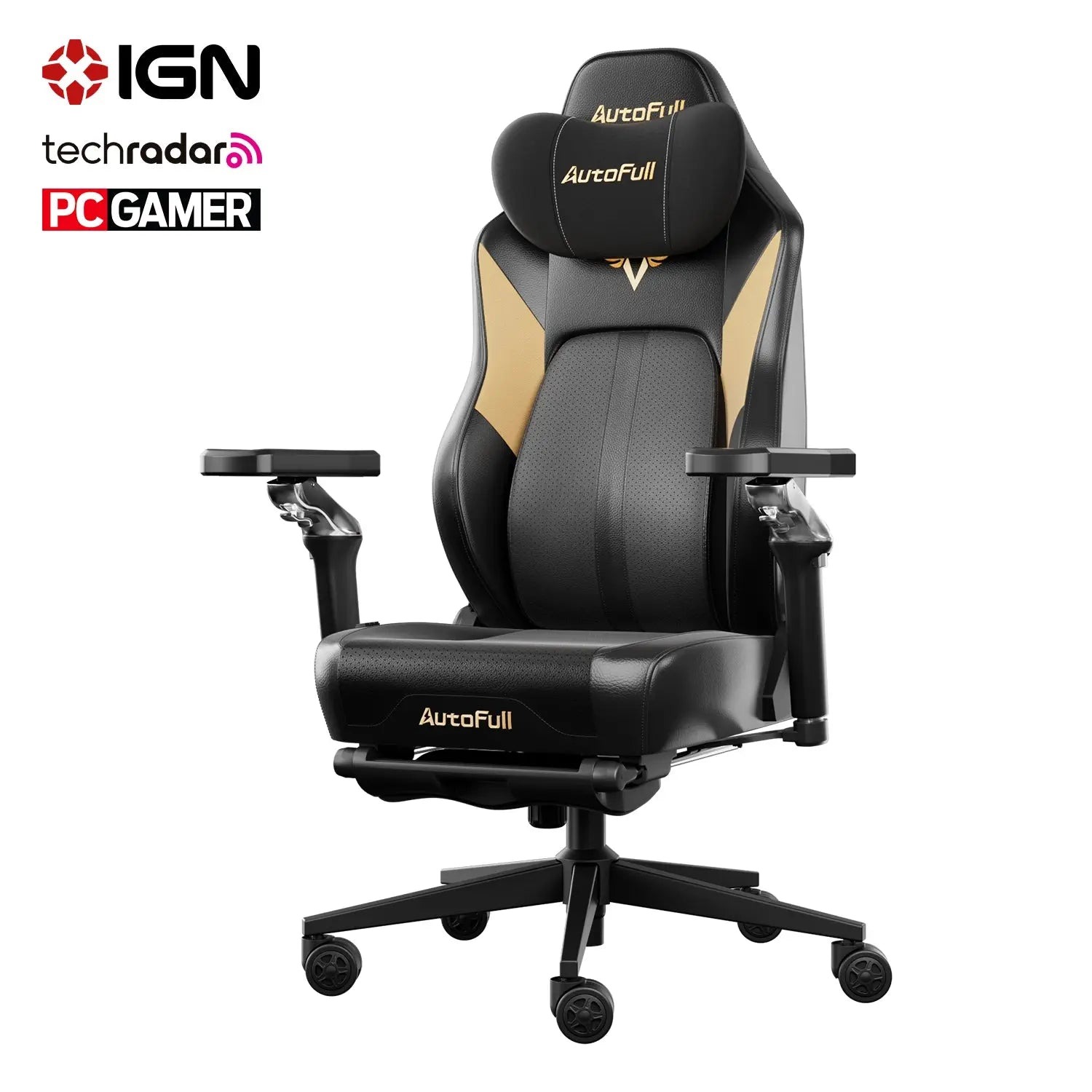
Gaming chairs have carved out a distinct category in the seating market, and for good reason — they’re engineered around the demands of extended, focused sitting in ways that standard desk chairs often aren’t. Gaming chair support typically encompasses a combination of high backrests that extend to shoulder height, built-in or attachable lumbar cushions, adjustable armrests with multi-directional movement, and reclining mechanisms that allow position changes during long sessions. Brands like AutoFull have built their gaming chair lines around these principles, offering models with independently adjustable lumbar support designed to accommodate a range of body sizes. Compared to a conventional school chair or basic office seat, a well-designed gaming chair offers significantly more contact points between the chair and the child’s body, distributing weight more evenly and reducing localized pressure that builds up over hours of play or study.
That said, not all gaming chairs deliver on their ergonomic promises. Many are designed primarily around adult proportions, meaning a chair marketed as “youth-sized” may still be too large for a ten-year-old to sit in correctly. When the lumbar cushion sits at mid-back rather than lower back, or the seat is too deep for shorter legs to reach the floor, the ergonomic advantage disappears entirely. The key distinction to make when evaluating gaming chair support for a child is whether the chair’s adjustable range actually accommodates your child’s current measurements — not just whether it looks ergonomic or carries ergonomic branding.
Balancing Style and Ergonomics in Gaming Chairs
Children, particularly older kids and teenagers, are drawn to gaming chairs partly because of their bold aesthetic — the racing-seat styling, vivid color options, and gamer-associated branding carry real appeal. This isn’t something to dismiss; a child who genuinely likes their chair is far more likely to sit in it properly and stay seated at their desk rather than migrating to a couch or floor. The practical approach is to use style as a tiebreaker rather than a primary filter. Start by narrowing options to chairs that meet your ergonomic criteria — correct size range, adjustable lumbar support, appropriate seat depth — then let your child choose from within that shortlist based on appearance. This keeps the decision grounded in function without ignoring the motivational value of a chair your child actually wants to use.
The Critical Role of Customer Support for Gaming Chairs
Purchasing a chair for your child is rarely the end of the transaction — it’s the beginning of a relationship with the brand. Customer support for gaming chairs matters more than most parents anticipate, precisely because assembly challenges, warranty claims, and replacement part requests are genuinely common experiences. A chair that arrives with unclear instructions or a damaged component becomes significantly less stressful to deal with when the manufacturer offers prompt, knowledgeable assistance. Before committing to a purchase, it’s worth treating the quality of post-sale support as seriously as the chair’s ergonomic specifications, since a great chair backed by poor service can quickly become a source of frustration rather than relief.
Good customer support for gaming chairs typically shows up in a few concrete ways: a clearly stated warranty that covers structural components for at least one to two years, responsive communication channels that go beyond a generic contact form, and accessible resources like video assembly guides or downloadable manuals. Some brands go further by offering replacement cushions, adjustment knobs, or caster wheels as purchasable spare parts — a meaningful advantage when a single component wears out and you’d prefer to extend the chair’s life rather than replace it entirely. AutoFull, for instance, provides dedicated after-sales support along with accessible spare parts, which reflects the kind of long-term brand commitment worth looking for. Reading through recent customer reviews specifically for mentions of post-purchase experiences, rather than just initial impressions, gives you a realistic picture of how a company treats buyers once the sale is complete.
What Makes a Reliable Customer Support System
When evaluating customer support before buying, look for brands that offer multiple contact channels — live chat, email, and phone — rather than relying solely on automated responses. Check whether the company publishes its average response time and whether reviews confirm that timeline holds in practice. A transparent return policy with a reasonable window, typically 30 days or more, signals that the brand stands behind its product. Verify whether the warranty covers manufacturing defects specifically, since vague warranty language often excludes the failures most likely to occur with daily use. Finally, look for brands that maintain an active FAQ section or troubleshooting library — these resources reduce the need to contact support at all, which is ultimately the most efficient system for busy parents.
Step-by-Step Guide to Choosing the Best Chair
With a clear understanding of what makes a lumbar support chair genuinely effective, the selection process becomes far more manageable. The steps below give you a practical sequence to follow — moving from your child’s individual needs through research, testing, and final verification — so you arrive at a confident decision rather than an educated guess.
Step 1: Assess Your Child’s Specific Needs and Activities
Start by measuring your child’s seated height, the distance from the floor to the back of their knee, and their shoulder width. These three numbers will immediately disqualify chairs that fall outside a workable adjustment range. Next, consider how your child primarily uses the chair — heavy gaming sessions demand stronger lumbar cushioning and reclining capability, while study-focused use prioritizes upright support and desk-height compatibility. Ask yourself whether your child tends to slouch forward, sit cross-legged, or shift frequently; each habit points toward specific features worth prioritizing, such as seat depth adjustment or a wider, more stable base.
Step 2: Research Brands and Read User Reviews
Once you have your child’s measurements and use-case in hand, narrow your search to brands that publish detailed adjustment range specifications rather than vague size descriptors like “youth” or “teen.” Cross-reference those specs against your measurements before reading reviews. When you do read reviews, filter specifically for feedback from parents of children in a similar age range, and pay close attention to comments about long-term durability and post-purchase support experiences. A chair with strong initial reviews but repeated complaints about cushion compression or unresponsive warranty service is a risk worth avoiding.
Step 3: Finalize Your Decision with Confidence
Before purchasing, run through a final checklist: Does the chair’s adjustment range cover your child’s current measurements with room to grow? Is lumbar support independently adjustable in both height and depth? Does the brand offer a meaningful warranty and accessible customer support channels? If you can test the chair in person, have your child sit in it for at least five minutes and observe whether their feet rest flat, their lower back contacts the lumbar support naturally, and their shoulders remain relaxed. When every box is checked, you’re not just buying a chair — you’re making a long-term investment in your child’s spinal health.
Investing in Your Child’s Spinal Health Through the Right Seating
Choosing the right lumbar support chair for your child is one of the most practical investments you can make in their long-term health. A developing spine is genuinely vulnerable to the cumulative effects of poor seating, and the habits formed during childhood tend to persist. Getting this decision right now means fewer postural problems to correct later.
The framework in this guide gives you everything you need to move forward with confidence. Prioritize adjustable lumbar support that can be repositioned as your child grows, verify that seat dimensions actually match your child’s measurements, and look beyond ergonomic branding to confirm real adjustability. When evaluating gaming chairs, treat style as a secondary consideration — function comes first. And don’t overlook the value of strong customer support; a warranty that holds up and responsive service channels protect your investment long after the chair arrives.
Your next step is straightforward: take your child’s measurements today, run them against the adjustment ranges of chairs on your shortlist, and apply the checklist from Step 3 before finalizing any purchase. A chair that genuinely fits your child’s body and supports their lower back properly isn’t just a piece of furniture — it’s daily preventive care for a spine that’s still being shaped by every hour they spend sitting in it.