QR codes are everywhere again, but the problem has changed. The hard part is no longer whether a phone camera can read a square pattern. The harder question is whether the tool behind that pattern keeps the destination transparent, keeps the workflow simple, and still gives teams enough control for print, product pages, invoices, and internal tools. That is why I tested url to qr code from a practical user perspective: not as a flashy marketing platform, but as a focused service that turns a link into a scannable image.
The first impression is deliberately plain. The page does not ask visitors to create an account before trying the generator. It presents a QR preview, a URL input field, format choices, error correction levels, size options, style controls, color settings, and link-copying actions. That matters because QR work often happens inside a larger task. A designer may be preparing packaging. A developer may be generating PDFs. A marketer may be building a flyer. In those situations, the best tool is often the one that does not become another system to manage.
The central claim is also clear: the QR code contains the exact link provided by the user. It is not described as a URL shortener, and it does not position itself as a redirect-based tracking platform. From a trust perspective, that is the most important detail on the page. A printed QR code may live on a box, brochure, label, or ticket for months or years. If the code depends on a middle redirect service, the long-term reliability of the printed material can become harder to judge.
Table of Contents
Testing Method Used For This Review
I looked at the product through three practical questions. First, can a non-technical user understand what is happening without reading a long manual? Second, can a developer or operator integrate the output into a real workflow without installing a software development kit? Third, does the visual control stay useful without making the QR code feel overdesigned?
The answer is strongest in the first two areas. The page explains the workflow in direct terms: paste a URL, generate a QR image, then use the image as PNG or SVG. It also shows that the same service can be used as an image source in HTML, called from a backend, or controlled through query parameters. That makes it feel less like a closed dashboard and more like a small, predictable web utility.
Task One: Create A Simple Scannable Code
The basic test task was straightforward: take a normal web address and turn it into a QR code image. The difficulty with this kind of task is not visual drama. It is confidence. Users need to know whether the QR code points where they expect, whether the output can be used in common formats, and whether the process requires extra account setup.
In this case, the flow is clean. The interface starts with a “Paste a URL” field and immediately frames the result as a QR preview. The format toggle includes PNG and SVG. PNG is suitable when a fixed image file is needed, while SVG is better for crisp scaling in print or responsive layouts. That distinction is not hidden behind advanced settings, which helps users make a practical choice early.
Where The Simple Flow Works Best
This simple flow is best for posters, business cards, digital documents, and one-off campaign assets. The main advantage is low learning cost. The limitation is also clear: this is not a campaign analytics suite. If a team needs scan counts, audience segmentation, or post-print destination editing, the page does not present those as built-in features.
Real Website Steps For Generating Codes
The official workflow is short enough to fit into a real production routine. It does not require a registration step, a pricing selection step, or a model selection step. Based on the page, the process can be understood in three practical stages.
Step One: Paste The Destination Link
The first step is to enter the URL that should be encoded into the QR code. This is the most important input because the service is designed around exact-link encoding rather than link shortening.
Keep The Destination Clear
For practical use, the destination should be the final page you want people to open. If a business uses its own tracking parameters, those parameters belong in the link itself before QR generation. The tool’s stated role is to encode the provided URL, not to replace a link strategy.
Step Two: Choose Format And Reliability
The page lets the user choose PNG or SVG, select an error correction level, and adjust the QR size. These controls are useful because a QR code for a small label has different needs from one used in a digital document.
Match Output To The Material
SVG is the stronger choice when the QR code must stay sharp in print or flexible layouts. PNG is practical for simple image placement. The error correction levels give users a way to prepare for real-world damage, small print, or partial obstruction, although a high-contrast design still matters.
Step Three: Adjust Style And Colors
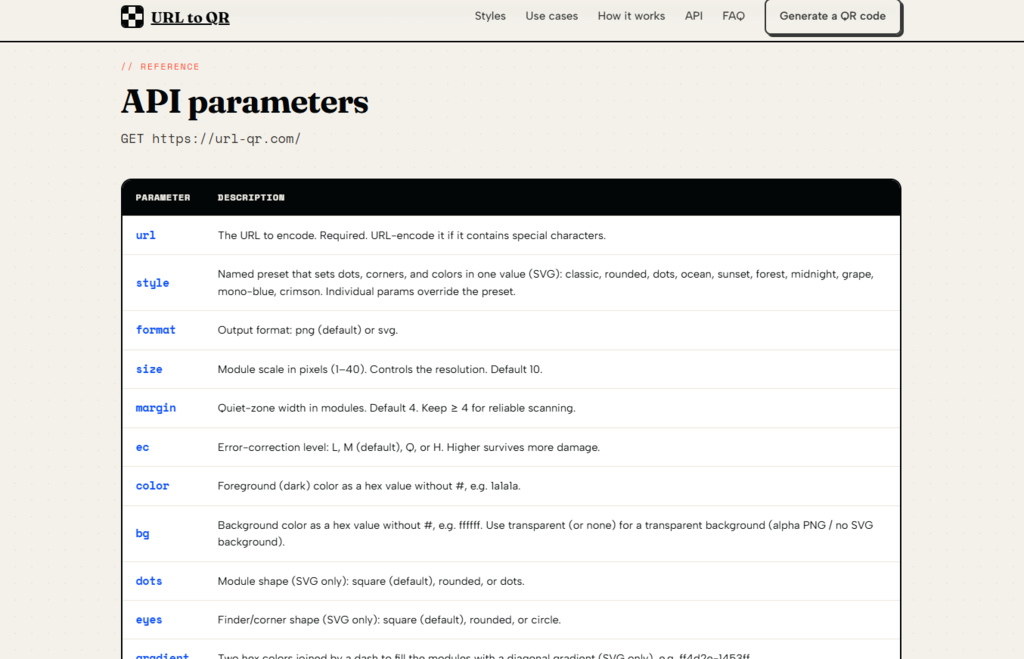
The visual panel includes presets such as classic, rounded, dots, and several color-themed styles. It also includes dot style, corner style, margin, foreground color, background color, transparency, and gradient options.
Use Design Controls Carefully
The useful detail is that the page warns that dot, corner, and gradient styles apply to SVG output, while PNG remains classic square. That is a practical constraint, not a weakness. It prevents users from assuming every visual option behaves the same across both formats.
Scenario Tests Across Real Use Cases
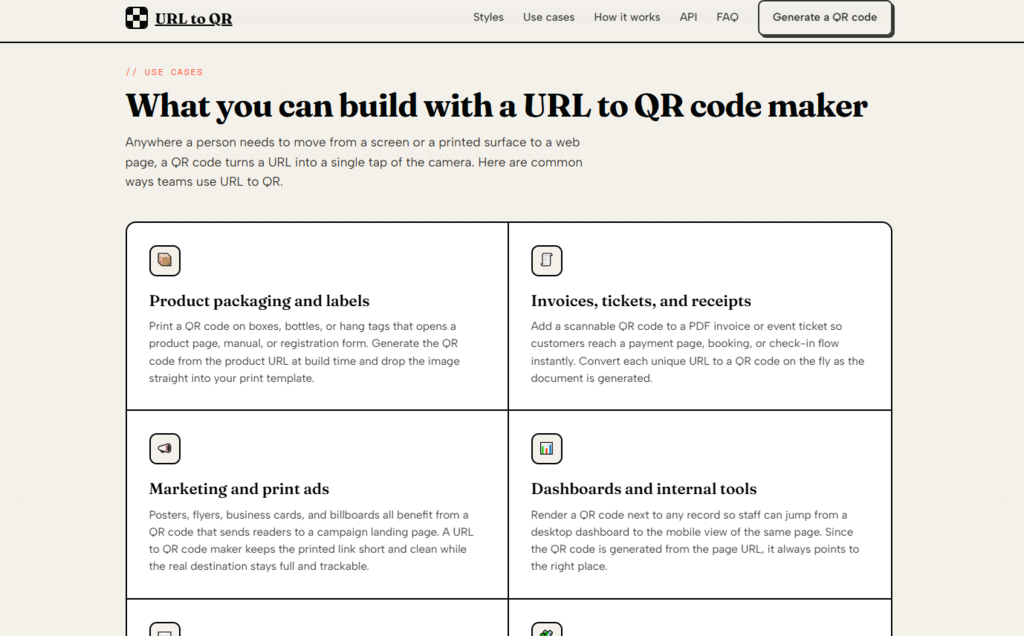
For packaging and labels, the product feels well aligned. The test task is to place a QR code on a surface that may be printed, shipped, handled, and scanned later. The difficulty is durability. A code needs enough quiet zone, enough contrast, and ideally a format that does not blur during scaling. From a practical user perspective, SVG output, size control, margin control, and higher error correction levels are the most relevant tools here.
For invoices, tickets, and receipts, the strongest point is integration. The official page describes using the QR image in generated documents or fetching it from a backend. That makes the url to qr code generator useful for workflows where each PDF may need a different payment page, booking page, or check-in link. The benefit is not that it replaces a billing system. The benefit is that it can turn each existing link into an image that fits into the document pipeline.
For dashboards and internal tools, the service is especially easy to understand. A team can render a QR code next to a record so staff can move from desktop to phone. The difficulty in this scenario is usually implementation friction. The page’s “just a URL” approach helps because developers can place the QR image in an image tag or request it from the backend without learning a separate SDK.
Visual Control Without Excessive Complexity
The visual controls are more detailed than a bare generator but not as heavy as a full design suite. The preview area, preset names, foreground and background fields, transparency option, and gradient toggle make the page feel practical for branded assets. The styling is not positioned as free-form graphic design. It is parameter-based customization around a QR code that must remain scannable.
Best Fit For Brand-Safe Variations
The best use of these controls is modest branding: a clean foreground color, a suitable background, enough contrast, and possibly a rounded or dotted SVG style. Complex visual experiments may look interesting, but they can also reduce scan reliability if contrast, margin, or size are handled poorly.

Comparison With Broader QR Workflows
| Evaluation Area | This Focused Generator | Typical Dashboard-Based Tool |
| Use threshold | Low, no sign-up needed to start | Often requires account setup |
| Core workflow | Paste or request a URL-based image | Create, save, manage, then export |
| Link handling | Encodes the provided URL directly | May use redirect or short-link layers |
| Visual control | Format, size, colors, presets, SVG styling | Often broader but more complex |
| Developer fit | Strong for image source and backend use | Depends on API access and account settings |
| Learning cost | Low for simple and repeated tasks | Higher if campaign tools are included |
| Best scenario | Direct QR images for products, docs, apps | Dynamic campaigns and analytics workflows |
This comparison is not meant to say one category is always better. It shows the tradeoff. A redirect-based QR platform can be useful when scan analytics and editable destinations are required. A direct URL QR image service is better when transparency, simplicity, and durable printed destinations matter more.
Real Limitations Worth Knowing Before Use
The main limitation is that the service is not presented as a dynamic QR marketing platform. Because the QR code encodes the exact URL, changing the destination later means generating and replacing the QR code, unless the original destination is a link you control and can update on your own side. That is not a flaw in the stated design. It is a consequence of choosing direct encoding over redirect management.
Another limitation is that design choices still affect scannability. The page provides error correction, margin, size, color, and background controls, but users should still test the final code on real devices, especially before printing. Low contrast, very small placement, glossy materials, or aggressive styling may create problems even when the generated code itself is valid.
There is also no need to describe it as more than it is. The page does not claim built-in analytics, account dashboards, editable destination history, or a batch management interface. It does describe bulk conversion as a pattern: loop over a list of URLs, build image links, and request them as needed. That is useful for developers, but non-technical users expecting a spreadsheet-style batch dashboard may need a separate workflow.
Who Should Consider This QR Workflow
This tool is a good fit for developers, SaaS builders, document automation teams, marketers preparing straightforward print assets, and operators who want predictable QR images without managing another dashboard. It is also useful for people who care about knowing exactly what the QR code contains.
It is less suitable for teams whose main requirement is campaign analytics, post-print destination editing, or customer behavior tracking. Those needs usually require a redirect layer and a management system. This product’s strength is different: it keeps the QR code close to the original link and makes the image easy to embed, copy, or generate through a simple request.
The most convincing part of the experience is not a dramatic feature list. It is the restraint. The page makes a narrow promise, supports the promise with visible controls, and explains how the same pattern works for HTML, backend requests, customization, PDFs, packaging, emails, and apps. For users who want a QR code to behave like a clean picture of a URL, that narrowness is exactly the point.
-

-
-

-

-

-